Model point files you can prove
TRACE turns policy-system month-end extracts into a reconciled, signed-off model point file: checked against the interface specification, scored against your success criteria, traced field by field and locked once three people have signed.
What TRACE does
- Interface checks. Every month-end file is checked against its layout: fields, types, allowed values and referential links between files.
- Data quality with reasons. Record-level checks, each exclusion with its reason, and control totals that agree with the extract to the cent.
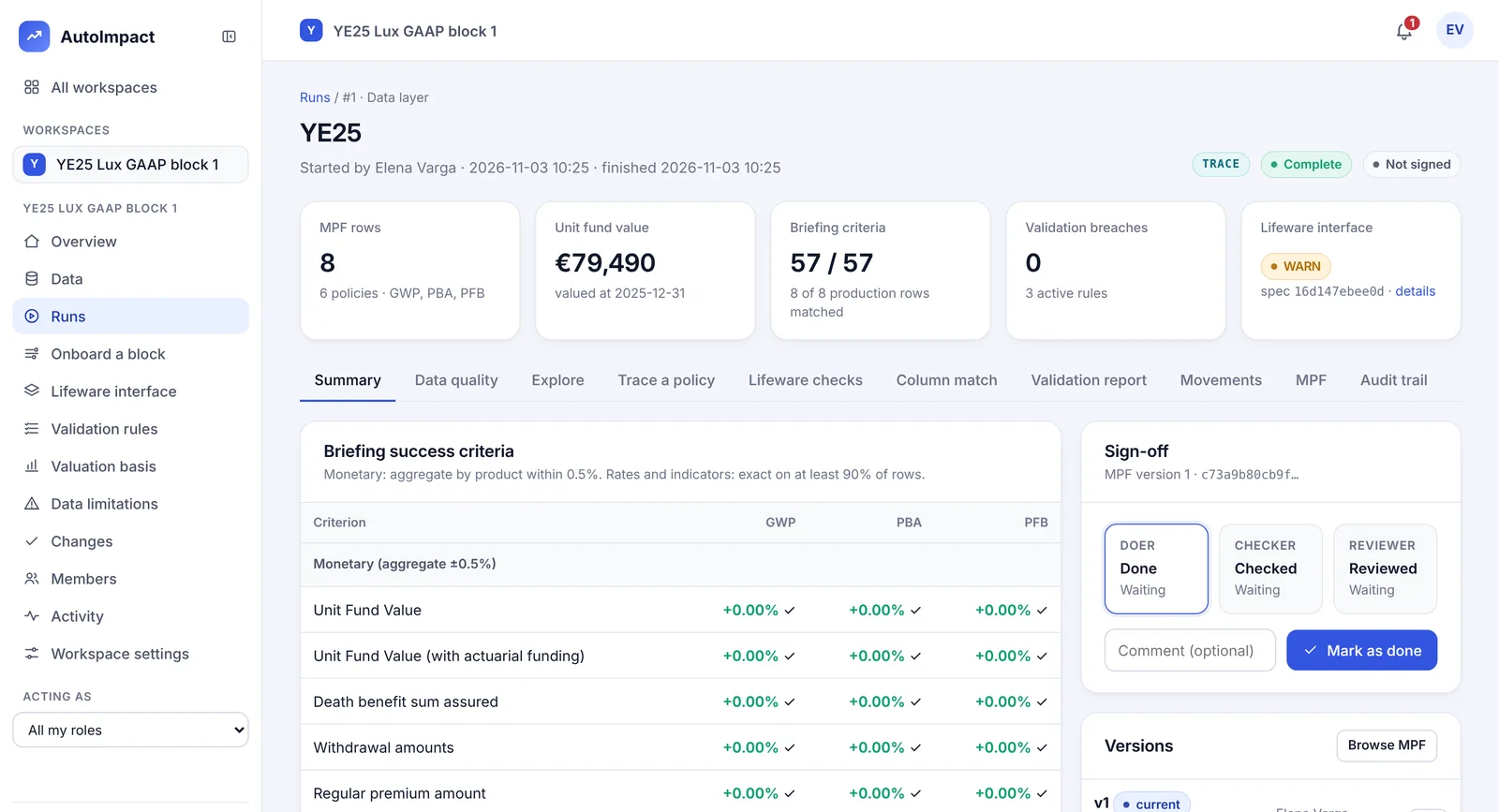
- Model point file build. Policies, contracts and funds combined with unit prices, fund mapping and exchange rates, with a lineage entry for every column.
- Reconciliation. Field by field against the production model point file or last year's, scored against your criteria (for example, monetary totals by product within 0.5%, rates exact on 90% of rows).
- Movements. New business, exits and transfers between month-ends, validated.
- Validation rules you write. Built in a form, not code, each change approved by a second person and audited.
New As files arrive
Recognised, checked and reported before any run
Upload the month-end as it comes. TRACE works out what each file is and says why, checks it, and opens the check report straight away, so problems go back to the source while there is still time.
Reading the records…
- Record indicator FH in 8 of 8 records
- Companies E (7) and L (1)
- 18 fields per record · the specification gives 16
Recognised, with the reason
A table is scored against every layout TRACE reads and your saved column mappings: the share of expected columns found and of the file's columns that were expected. It is accepted only when it is clearly one of them. A renamed Lifeware file is recognised by the record type in its records.
Refused when it is plainly something else
A file uploaded as the wrong kind, or two different files that would both be the same Lifeware file, are refused with the reason, so nothing lands in the wrong slot.
A check report for every upload
Each file's result and every finding, as blocking, rejected, warning or info, sortable and exportable as CSV. The report is tied to the file's fingerprint, and a reporting cycle won't accept a file with blocking findings.
New Your choice, rule by rule
Rules that warn, or rules that stop the run
Each validation rule is a warning, which lists its breaches for a look while the run goes on, or blocking, which stops a strict run while any record breaks it. Changing either needs a second person, and every rule reads back as a sentence.
You choose which rules stop the run. A second person approves the change.
See it run
A month-end upload, start to report
Twelve Lifeware files, one renamed. Each is recognised, checked against the interface specification and listed with its findings.
Configure it yourself
Your data rules, without code
The people who know the data set the rules it is checked against. Nothing waits for a developer.
Validation rules
Pick the column, the test (between, outside, one of, blank, not blank, above, below), the limits and whether a breach warns or blocks, by product or movement type. A second person approves it and it applies from the next run.
Interface layouts
Import your policy system's metadata workbook. TRACE shows every layout change for approval, then checks each month-end file against it.
Onboarding a new block
Upload a sample extract with any column names and TRACE suggests how each one maps to the standard layout, with its confidence.
Saved column mappings
On Onboard a block, upload a sample, check or change each column's suggested target, name the mapping and propose it. Once approved, choose it when uploading that block's policy extract, and the columns are renamed or left out.
Data transformations
Derived columns written in plain language on the other columns, value maps and defaults for blanks. Each step applies to the model point file that data-layer runs build, or to a policy extract before a model run.
Every step on the record
A step applies at each build once a second person approves it. Each run records how many rows every step changed, and the lineage of the columns it wrote, on the Trace tab. The keys runs join on can't be changed by a step.
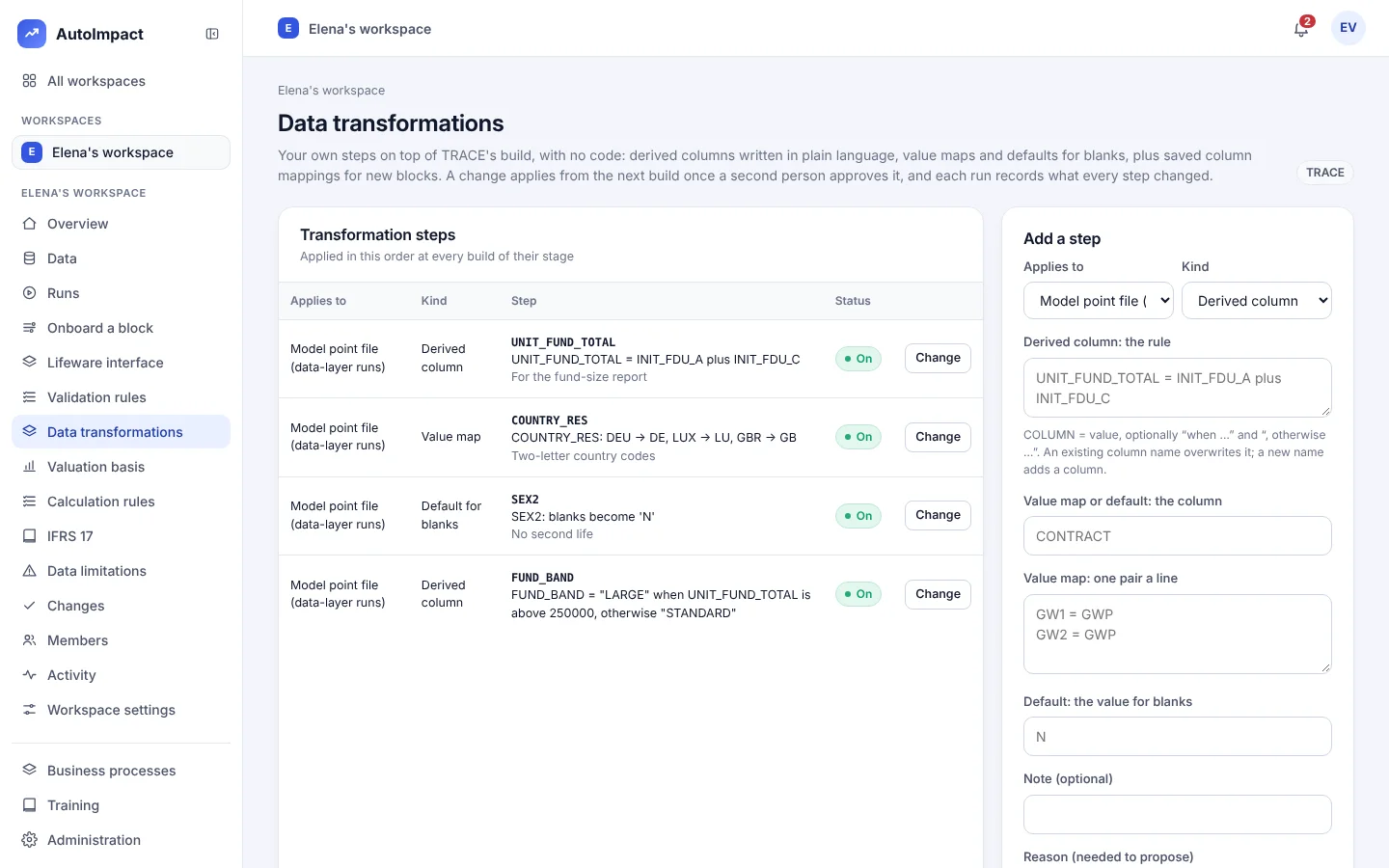
Examples: a derived column UNIT_FUND_TOTAL = INIT_FDU_A plus INIT_FDU_C, and a value map for country codes, DEU → DE. See everything you control without code and how the reconciliation works.
Sign-off and control
Three-person sign-off
Doer, checker and reviewer sign each model point file, and every step of the reporting cycle. Once locked, it can't change; a correction is a new version with its reason.
Personal data stays out
Names and addresses are removed on upload, policy numbers become keyed pseudonyms, and special-category fields are masked for anyone without the right.
Evidence pack
Every run's inputs and outputs are fingerprinted in a manifest, exportable as an evidence pack for audit.
Questions about TRACE
Which policy systems does TRACE read?
TRACE reads Lifeware-format month-end extracts out of the box, checked against layouts generated from the extract metadata workbook. Other systems are onboarded by profiling a sample file and mapping its fields.
Can we set up the data checks ourselves?
Yes. Validation rules are written in a form by the data team, with no code, and apply from the next run once a second person approves them. Interface layouts are imported from your metadata workbook.
Can we change column mappings and data transformations without a developer?
Yes. On the Data transformations page you add derived columns written in plain language, value maps and defaults for blanks. Each step applies at every build once a second person approves it, and each run records how many rows every step changed. On Onboard a block you save a column mapping for a new block, and choose it when you upload that block's policy extract.
Can it produce Prophet model point files?
Yes. A locked model point file can be exported to Excel and to Prophet model point files, so TRACE can sit in front of an existing actuarial model.
Read next: a model point file reconciliation checklist.
See TRACE reconcile your own extract
Bring a month-end extract and last year's model point file. We'll build, reconcile and sign off a model point file with you.
Or email hello@autoimpact.co.uk · Ask for the brochure