Reconciled, valued, signed off.
You own and control your calculations, data checks and reporting, without writing code. Not a black box: from policy-system extracts to Lux GAAP, Solvency II and IFRS 17, every figure shows how it was made.
Read the story as text
- Month-end lands on your desk. Month-end: policy extracts, unit prices, fund maps, exchange rates, last year's model points and a chain of emails, all landing on you.
- Reconciling by hand. Then the reconciliation: does the new model point file tie to production, field by field, in a spreadsheet?
- Three bases, three models. Lux GAAP, Solvency II and IFRS 17 each live in their own model and spreadsheets, and the numbers still have to agree.
- Then audit asks. And then audit asks you to prove it: who changed the basis, where a figure came from, and whether anyone checked it.
- AutoImpact. AutoImpact does that work in one application your team controls, without code and without a black box: TRACE for the data, PRISM for the modelling.
- TRACE builds and reconciles. TRACE checks every file against the interface specification, builds the model point file and reconciles it to production, with every exception listed.
- PRISM values it every way. PRISM projects the cash flows once and values them on each approved basis: Lux GAAP, the Solvency II best estimate and the IFRS 17 CSM.
- Checked, signed, locked. Doer, checker and reviewer each sign; nobody checks their own work. The reviewer workbook rebuilds every figure in Excel and agrees to the cent.
- Reconciled, valued, signed off. Reconciled, valued, signed off. The same day, on your own machines, with every step open to review.
Built and assessed against
Assessment against each standard is described on the standards page. Self-assessments are not certifications. Powered by TRACE for the data and PRISM for the modelling.
Yours to control
You own the calculation. It is not a black box.
Your team controls the calculations, the data transformations and the reporting, without writing code. Every figure can be traced to its formula, its data and the person who approved it.
Set the basis yourself
Every assumption and method choice is on screen. Load a basis or change one item in a form, with the reason; a second person approves it.
Write your own rules
Validation rules, column mappings, data transformations and add-on items on the Lux GAAP valuation, in forms and plain language, not code.
Read every formula
Open any policy to see each figure in plain language: its formula, its inputs and the basis item it used.
Take the results anywhere
Every output downloads as CSV or Excel, and the reviewer workbook rebuilds the calculation in ordinary formulas.
New Reporting cycles with do, check and review on every step, a check report for every upload, validation rules that warn or block, versions you can compare and a methodology document written from the rules in force. See everything you control without code.
New November 2026 release
Control every reporting period, step by step
Who did each step, who checked it, what it rested on and what the rules were at the time, all in the application and nothing in email.
Reporting cycles
Each period in five steps (data, transform and validate, assumptions and basis, model, reporting), each done, checked and reviewed by three people, with notes and evidence. A step sent back starts again.
Read moreTRACEFiles recognised and checked
Every upload says what each file is and why: its columns against every layout and your saved mappings, or a Lifeware file's own records. Then a check report, file by file.
Read moreTRACERules that warn or block
You choose, rule by rule: a warning lists the breaches and the run goes on, a blocking rule stops a strict run.
Read morePRISMA methodology that writes itself
The methodology document is written from the definitions in force, with a fingerprint. Approve a change and the document changes with it.
Read moreTRACEVersions you can compare
Every approved change keeps its before and after. Compare any two versions of a rule or setting, line by line.
Read moreTRACEProduction and testing
A production cycle enforces order, three people and clean evidence. A testing cycle records the same and warns instead, and never stands as a sign-off.
Read moreAs files arrive
Every file recognised, checked and reported
Upload the month-end as it comes, renamed files and all. AutoImpact works out what each file is from its content, says why, checks it against the interface specification and gives you the report before any run.
Reading the records…
- Record indicator FH in 8 of 8 records
- Companies E (7) and L (1)
- 18 fields per record · the specification gives 16
What it does
From extract to sign-off, in one place
Valuation teams spend month-end moving data between the policy system, spreadsheets and the actuarial model, then proving it all ties up. AutoImpact does that work in one application, with the checks, approvals and audit trail built in.
Load
Policy-system month-end files, unit prices, the fund mapping and exchange rates, checked against the interface specification.
Reconcile
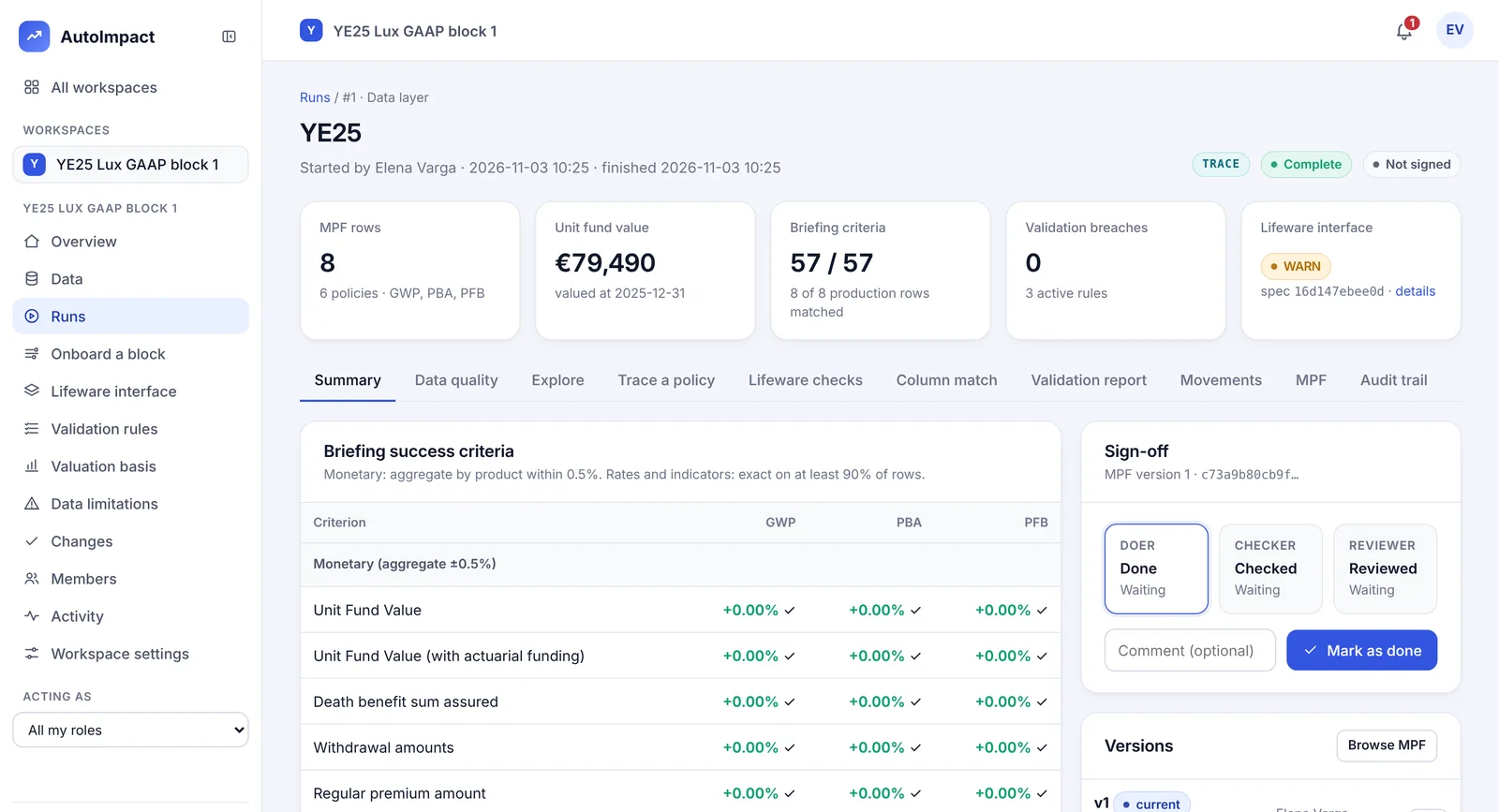
The model point file, built and reconciled field by field to production against your success criteria.
Value
Lux GAAP and IFRS 17 on your basis: reserves, fulfilment cashflows, the risk adjustment and the CSM.
Sign off
Doer, checker and reviewer each sign every step of the reporting cycle. Every correction is a new, recorded version; every change to a basis needs a second person.
Two engines
TRACE for the data. PRISM for the modelling.
- TRACE, the Transformation, Reconciliation, Automation and Control Engine: extracts, data quality, model point files, reconciliation, lineage and sign-off.
- PRISM, Policy Rules and Insurance Simulation Modelling: cashflow projection, best estimate liabilities, Lux GAAP reserves and the IFRS 17 CSM engine.
- One control layer across both: roles built from business processes, second-person approval, a hash-chained security log.
Independent review
Check it yourself, in Excel
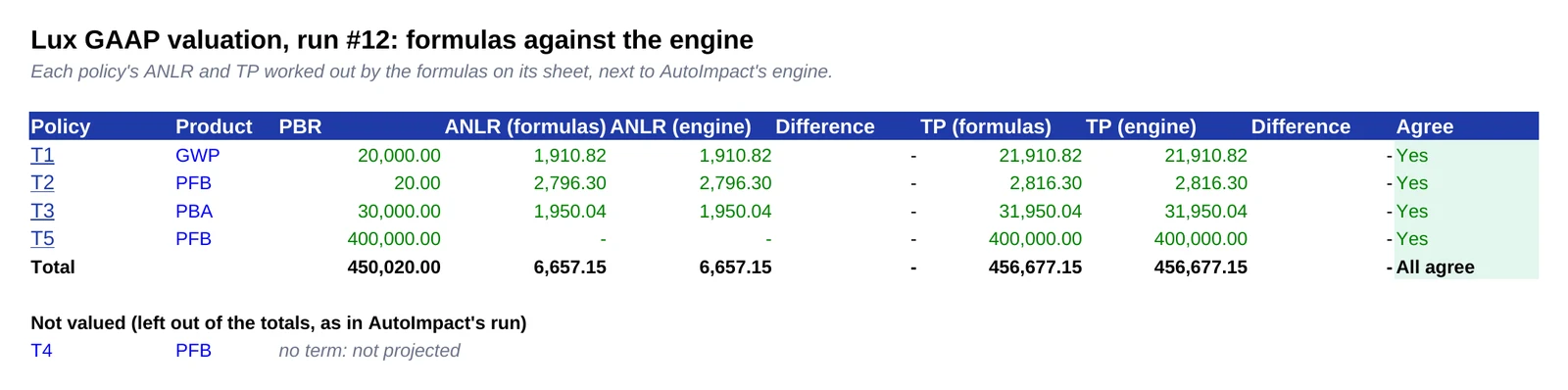
Every valuation run comes with a reviewer workbook: the calculation rebuilt in ordinary Excel formulas from the same inputs and basis, with AutoImpact's figures beside them and a check that they agree to the cent.
- Formulas you can read. Plain arithmetic and lookups, nothing hidden.
- Test the basis. Change a rate, a lapse table or the cost of capital and everything recalculates.
- Two implementations that agree. AutoImpact's tests recalculate the workbook and require agreement.
See it run
Your first valuation in under a minute
Load a book, start a run and read the best estimate, the cost of guarantees and the reconciliation to last year's model points.
Treatments
Lux GAAP, Solvency II and IFRS 17 from one projection
Lux GAAP
Mathematical and unit-linked reserves on your basis note's definitions.
Solvency II best estimate
Best estimate liabilities on the EIOPA curves, and the cost of financial guarantees.
IFRS 17 GMM and VFA
The CSM roll-forward, risk adjustment, reinsurance held, transition and disclosures.
All features and treatments · Roadmap: the 2027 Solvency II review, SCR, QRTs, ORSA and embedded value
Why teams choose it
Control without the platform overhead
On your machines
A Windows installer that needs no administrator rights, or a Linux container with PostgreSQL. Your data stays on your network.
Governed by design
What a person can do comes from the business processes in their role. Basis changes and resets need a second person.
Transparent calculation
Every policy, month and step shows its formula and the basis item it used. The methodology document is written from the same definitions.
Where teams start
Start with the problem you have
No-code actuarial software
Rules, mappings and calculation items your team writes and approves, with no code.
Read moreModel point file reconciliation
Field by field to production, scored against your criteria, signed off by three people.
Read moreIFRS 17 on your Prophet or AXIS results
Load cash flows by group from any model and run the CSM roll-forward and disclosures.
Read moreUnit-linked valuation and Lux GAAP
Policy by policy and month by month, with every step shown and checkable in Excel.
Read moreWhen AutoImpact fits, and when it doesn't
A fair guide for teams weighing it against a large actuarial platform.
Read moreTalk it through
A 30-minute demo, focused on your book and your reporting dates.
Book a demoInsights
Practical notes for valuation teams
Dated, sourced notes on the 2027 regulatory changes and the everyday work of a valuation team.
Solvency II review 2027: what changes in the risk margin
From 30 January 2027 the cost of capital falls from 6% to 4.75% and a lambda factor weights later years less. What changes and what to prepare.
Read the articleIFRS 18IFRS 18 for insurers: what changes in IFRS 17 reporting
IFRS 18 applies to periods beginning on or after 1 January 2027, with comparatives restated. What it means for the IFRS 17 lines and the data behind them.
Read the articleDataA model point file reconciliation checklist
A practical checklist for reconciling a model point file to the policy system and last period: control totals, field by field, movements and sign-off.
Read the articleQuestions
How does a reporting period run in AutoImpact?
As a reporting cycle: data, transform and validate, assumptions and basis, model, and reporting. Each step is done, checked and reviewed by three different people, with notes and the files or runs it rests on. In a production cycle the steps go in order and evidence with blocking findings is refused. Nothing in the record is ever changed or deleted.
Do we need to write code to use AutoImpact?
No. The basis, method choices and validation rules are set in forms, data transformations and column mappings are set up in TRACE, and add-on items for the Lux GAAP valuation are written in plain language in PRISM. Every change is approved by a second person, and every figure shows its formula in plain language.
What is AutoImpact?
AutoImpact is actuarial software for life insurers. It takes policy-system extracts to a reconciled, signed-off model point file (TRACE), then values the business under Lux GAAP and IFRS 17 (PRISM), with every calculation rebuilt in an Excel reviewer workbook so it can be checked independently.
Does our data leave our network?
No. AutoImpact installs on a Windows PC or runs in a Linux container on your own servers. Names and addresses are removed on upload and policy numbers are replaced with keyed pseudonyms; no AI service is sent your data.
Which IFRS 17 measurement models does it cover?
The general measurement model (GMM) and the variable fee approach (VFA), with a cost-of-capital risk adjustment, the CSM roll-forward, reinsurance held, transition approaches and the disclosure reconciliations.
See it on your own data
A 30-minute call: we show TRACE and PRISM on the demo book, then talk through your extracts, your basis and your reporting dates.
Or email hello@autoimpact.co.uk · Ask for the brochure